This article will focus on the table top/placard QR code, which can easily be set up and used by anyone and requires no technical skill.

Install the app
How to install the app on iOS
Follow along with the video below to see how to install our site as a web app on your home screen.
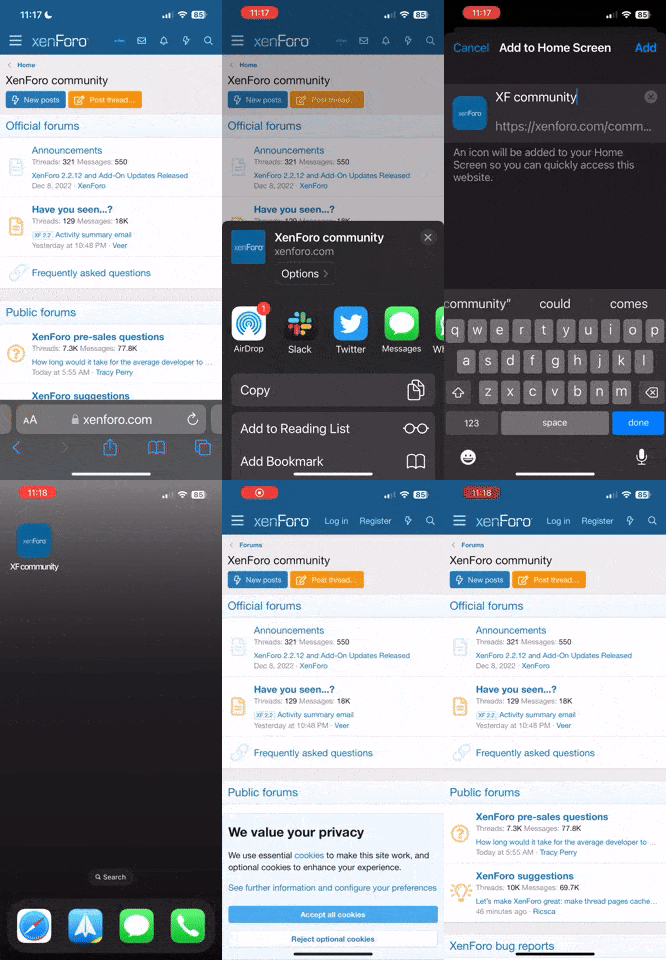
Note: This feature currently requires accessing the site using the built-in Safari browser.
-
Short guides to forum navigation, searching, posting, translation, alerts and notifications viewable by clicking here.
-
Türk dostlarımıza hoş geldiniz Giriş burada.
-
 Scammers are running ads on Facebook and Instagram claiming a giveaway. DO NOT OPEN THESE LINKS AND LOG IN. See this thread: here
You are using an out of date browser. It may not display this or other websites correctly.
You should upgrade or use an alternative browser.
You should upgrade or use an alternative browser.
Using Kinesis Pay
- Thread starter Uchiki
- Start date

Firstly, I'll reference the existing documentation that is more focused on the initial iteration, which is the WooCommerce integration.
As indicated in this guide, both corporate and individual accounts can use the Merchant facility via the web application to receive KAU and KAG payments via Kinesis Pay.
https://support.kinesis.money/hc/en...45085-Kinesis-Pay-Everything-you-need-to-know
This article refers to the SDK that a merchant can be used to integrate Kinesis Pay with WooCommerce.
It also walks through how to use Kinesis Pay as a customer.
https://support.kinesis.money/hc/en...-do-I-use-Kinesis-Pay-as-a-merchant-purchaser
The inputs required to set up as a Merchant are detailed here:
https://support.kinesis.money/hc/en...885-How-do-I-set-up-Kinesis-Pay-as-a-merchant
As indicated in this guide, both corporate and individual accounts can use the Merchant facility via the web application to receive KAU and KAG payments via Kinesis Pay.
https://support.kinesis.money/hc/en...45085-Kinesis-Pay-Everything-you-need-to-know
This article refers to the SDK that a merchant can be used to integrate Kinesis Pay with WooCommerce.
It also walks through how to use Kinesis Pay as a customer.
https://support.kinesis.money/hc/en...-do-I-use-Kinesis-Pay-as-a-merchant-purchaser
The inputs required to set up as a Merchant are detailed here:
https://support.kinesis.money/hc/en...885-How-do-I-set-up-Kinesis-Pay-as-a-merchant
Using the Table Top/Placard QR code
There is now an additional step in the Merchant setup, which asks for your Preference Currency.
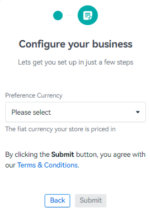
This is particularly relevant for the additional feature which allows you to download a table top or placard QR code which can be used for payments of variable amounts and requires nothing but a Kinesis account to use.
Many fiat currencies are available and the list isn't limited to those featured at the Kinesis Exchange.
This is where you access your table top/placard QR code.
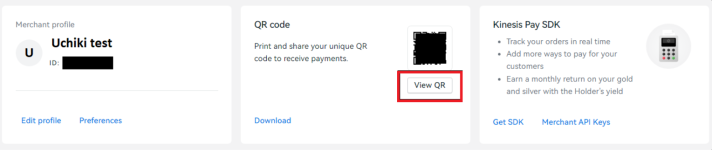
You can print this out, display it on a website or just transfer for display via a phone or tablet screen.
When it's scanned by someone using the mobile app, they are prompted to enter a value of the preferred currency that you selected during your merchant setup.
This will typically be the price of some goods or services that you provide.
This is then converted to KAU and KAG.
If they confirm the payment, they will be debited that amount and you will receive that amount less the 0.45% fee.
You can change the preferred currency at any time and this will then be used to calculate the conversion to KAU and KAG for all payments from then on.
The table top/placard QR code will remain the same regardless of any changes to the preferred currency.
There is now an additional step in the Merchant setup, which asks for your Preference Currency.
This is particularly relevant for the additional feature which allows you to download a table top or placard QR code which can be used for payments of variable amounts and requires nothing but a Kinesis account to use.
Many fiat currencies are available and the list isn't limited to those featured at the Kinesis Exchange.
This is where you access your table top/placard QR code.
You can print this out, display it on a website or just transfer for display via a phone or tablet screen.
When it's scanned by someone using the mobile app, they are prompted to enter a value of the preferred currency that you selected during your merchant setup.
This will typically be the price of some goods or services that you provide.
This is then converted to KAU and KAG.
If they confirm the payment, they will be debited that amount and you will receive that amount less the 0.45% fee.
You can change the preferred currency at any time and this will then be used to calculate the conversion to KAU and KAG for all payments from then on.
The table top/placard QR code will remain the same regardless of any changes to the preferred currency.
What are the costs of using Kinesis Pay as a merchant?
As a merchant, you will want to know the costs of receiving payments via Kinesis Pay.
As a merchant, you will want to know the costs of receiving payments via Kinesis Pay.
- There is the 0.45% fee referred to above.
- If you want to convert to fiat, the trading commission is 0.22%.
- There may be movement in either direction in the KAU/KAG to fiat exchange value between the time that the calculation is done and any conversion to fiat.
What prices are used to calculate the amount of KAU or KAG?
Calculation of the KAU and KAG amounts is done using spot (XAU/XAG) prices.
Where the preference currency isn't USD, FX mid prices are also used.
These prices correlate quite well with the market maker's best bids.
In testing, I found good correlation with the market maker's best bid for KAG at the Kinesis Exchange, whereas there was more variation with KAU.
It could be the market maker's second best bid or even slightly above their best bid.
In any case, where there was variation from their best KAU bid, it was small (typically 0.08%).
Given the above, an immediate sale for your preferred fiat at the best bid price should be pretty much at the price that was used to calculate the KAU/KAG amount from the fiat total.
Calculation of the KAU and KAG amounts is done using spot (XAU/XAG) prices.
Where the preference currency isn't USD, FX mid prices are also used.
These prices correlate quite well with the market maker's best bids.
In testing, I found good correlation with the market maker's best bid for KAG at the Kinesis Exchange, whereas there was more variation with KAU.
It could be the market maker's second best bid or even slightly above their best bid.
In any case, where there was variation from their best KAU bid, it was small (typically 0.08%).
Given the above, an immediate sale for your preferred fiat at the best bid price should be pretty much at the price that was used to calculate the KAU/KAG amount from the fiat total.
How do these payments show up on the blockchain?
Amount/Fee
On the blockchain, the fee is attached to the Send transaction, so from a technical point of view is being paid by the customer.
However because the KAU/KAG price of the goods/service that they pay is discounted by the amount of the fee, before the fee is added back to get to the value of the goods/service, it is in effect funded by the merchant.
The customer only pays the sticker amount of the goods/services converted to KAU/KAG as described further up.
To/from addresses
There will be a Create Account record from the central Hot Wallet address to the deposit address of the Merchant, followed by an Account Merge from the deposit address of the Merchant.
The deposit address of the customer doesn't feature for this transfer.
It would look something like this:

Amount/Fee
On the blockchain, the fee is attached to the Send transaction, so from a technical point of view is being paid by the customer.
However because the KAU/KAG price of the goods/service that they pay is discounted by the amount of the fee, before the fee is added back to get to the value of the goods/service, it is in effect funded by the merchant.
The customer only pays the sticker amount of the goods/services converted to KAU/KAG as described further up.
To/from addresses
There will be a Create Account record from the central Hot Wallet address to the deposit address of the Merchant, followed by an Account Merge from the deposit address of the Merchant.
The deposit address of the customer doesn't feature for this transfer.
It would look something like this:
How can I try out the Merchant functionality?
As stated in the help article in post #2, you can set this up on any KYC'd and funded account.
If you have a corporate and individual account, you can make test payments from one to the account for which you have done the Merchant setup.
If you just have one account, you can actually do a Kinesis Pay payment to the same account.
The minimum payments are 0.03 KAU or 0.03 KAG.
In practice, you need to enter a fiat amount that results in KAU/KAG amounts that just exceeds either of these.
You can also test larger amounts (to minimise rounding) to check the calculation of the KAU/KAG amounts, but if they are test amounts, ensure you back out before confirming the payment.
As stated in the help article in post #2, you can set this up on any KYC'd and funded account.
If you have a corporate and individual account, you can make test payments from one to the account for which you have done the Merchant setup.
If you just have one account, you can actually do a Kinesis Pay payment to the same account.
The minimum payments are 0.03 KAU or 0.03 KAG.
In practice, you need to enter a fiat amount that results in KAU/KAG amounts that just exceeds either of these.
You can also test larger amounts (to minimise rounding) to check the calculation of the KAU/KAG amounts, but if they are test amounts, ensure you back out before confirming the payment.
WooCommerce example
If you want to see the demo online shop that Jeff put together, see this thread:
https://forum.kinesis.money/threads/kpay-demonstration-shop.1491/
The amount of KAU or KAG is calculated as described in post #5.
How long does the customer have to complete the payment?
When generated from the WooCommerce integration, the KAU/KAG amount seems to be included in the QR code.
There is a countdown timer which starts at 9 minutes 30 seconds from creation of the QR code.
After this time, the QR code expires and a new one needs to be generated, with recalculated KAU/KAG amounts.
The customer can make the payment at the set amount of KAU or KAG until the countdown timer runs out.
This is the case even if the customer closes their app and restarts it or chooses to pay from a different account.
If you want to see the demo online shop that Jeff put together, see this thread:
https://forum.kinesis.money/threads/kpay-demonstration-shop.1491/
The amount of KAU or KAG is calculated as described in post #5.
How long does the customer have to complete the payment?
When generated from the WooCommerce integration, the KAU/KAG amount seems to be included in the QR code.
There is a countdown timer which starts at 9 minutes 30 seconds from creation of the QR code.
After this time, the QR code expires and a new one needs to be generated, with recalculated KAU/KAG amounts.
The customer can make the payment at the set amount of KAU or KAG until the countdown timer runs out.
This is the case even if the customer closes their app and restarts it or chooses to pay from a different account.
Dante Roman
Well-known member
Is there the option to oncharge the or an amount for merchant fee to the customer?
Part of the T&C is that the fee is covered by the merchant.Is there the option to oncharge the or an amount for merchant fee to the customer?
When merchants set their selling prices, they will need to take account of all their costs, including the likelihood that most customers will currently be paying by card.
I guess that they could offer a discount to those paying by Kinesis Pay based on any saving that they make over receiving card payments.
Search for "Kinesis Pay" in
Terms and conditions
Review the Kinesis Terms and Conditions to understand our user agreement, policies, and guidelines for using our digital asset platform.
 kinesis.money