

• Short guides to forum navigation, searching, posting, translation, alerts and notifications viewable by clicking here.
  • Türk dostlarımıza hoş geldiniz Giriş burada.
  • Scammers are running ads on Facebook and Instagram claiming a giveaway. DO NOT OPEN THESE LINKS AND LOG IN. See this thread: here
  • The Kinesis Community Forum will be down starting on Friday, Eastern Standard Time, and is expected to be back online on Monday. Big changes in the backend are coming!

[Forensics] KAG. Minting. Deep dive drill-down

Let us first consult the documentation for the Create Account operation.
Just kidding. There is none.
Actually Stellar has some here
So let's build our own.
Bash:
PS1="linux> "

KAG_extract=../dat/kag-stellar-export-using-Operations-TAB-2023-06-23-T02\:02\:41-UTC.csv
. ./KAG-set-main-account-symbols.sh

head -1 $KAG_extract
head -1 $KAG_extract | sed 's/,/\n/g' | nl -ba
head -1 $KAG_extract | sed 's/,/\n/g' | nl -ba > KAG-header

https://stackoverflow.com/questions/6022384/bash-tool-to-get-nth-line-from-a-file

https://stackoverflow.com/questions/39849929/how-to-use-sed-to-extract-lines-in-specified-order

After much inspection (aka sweat and tears)
Bash:
linux> for i in 11 8 10 6 7 4 5; do      sed -n "${i} {p;q}" KAG-header; done
    11    "funder"
     8    "account"
    10    "startingBalance"
     6    "createdAt"
     7    "transactionHash"
     4    "type"
     5    "typeI"

Translated into English:

from
to
x
date
hash
create_Account
0

Translated into Tech Speak (aka data specs)

i
j
x[i,j]
date
hash
selection_key

Bash:
echo 'i
j
x[i,j]
date
hash
selection_key' > t

Bash:
linux> echo " 11 8 10 6 7 4 5" | sed 's/ /\n/g' | sed '1d' > u
linux> cat u
11
8
10
6
7
4
5
Bash:
linux> paste t u | column -t

Bash:
linux> paste t u | xargs printf "%-15s%10d\n"
i                      11
j                       8
x[i,j]                 10
date                    6
hash                    7
selection_key           4
5                       0

That's it.
That's our documentation for this record type.

That's how we will hit the data using awk.

Now we can do some real work.

I will now reply to my own thread.
This could go on for 5-10 replies...
I have prepared some but must think as I go.
 
Taking inspiration from previous work:
x1=`sed '1d' $KAG_extract | sed 's/\"//g' | awk -F, -v e=$KAG_EmissionAccount '($4=="create_account") && ($11==e) {sum_10 += $10} END {printf "%-10.2f\n", sum_10}'`

Open that up wide:

print $0 is all fields
empty {} does not work
print on its own does.

Code:
linux> sed '1d' $KAG_extract | sed 's/\"//g' | awk -F, '($4=="create_account") {print $0}' | more

Pick 1 hash out of the output of that [not shown]
113995673350705153

Hit the flat file yet again
adding some kewl stuff at the end of the query
Those line numbers are from above

echo " 11 8 10 6 7 4 5" | sed 's/ /p;/g'
linux> echo " 11 8 10 6 7 4 5" | sed 's/ /p;/g' | sed 's/^..//' | sed 's/$/p;/'
11p;8p;10p;6p;7p;4p;5p;
sed -n '11p;8p;10p;6p;7p;4p;5p;'

Bash:
linux> grep 113995673350705153 $KAG_extract | sed 's/,/\n/g' | nl -ba | sed -n '11p;8p;10p;6p;7p;4p;5p;'
     4    "create_account"
     5    "0"
     6    "2023-06-22T15:20:39Z"
     7    "d2a4523b10d18c4c17ebdbeceac96ae2bbfdb9fb5c3748508423de586001919d"
     8    "GB6P2FJK4BMZELLKVAAL6ZNQYIBECJCGKD2CQY4SBD3IQK4R34N3KPGS"
    10    "6.5000000"
    11    "GBTYCT2VVWURNU23ZSR3IPSXU6BRWT3ELIOQJAJOKGIHCLLE6YDX4A7E"

The order we gave sed gets overruled. ie ignored
We see the fields as they occur in the input file.

The field numbering is correct.
Reassuring 'cos that's what we use with awk.

$4
$6
etc...

This is all to make clear what we are reading and where from.
 
I am doing this all kind of in slow-motion to atone for my error back in March-April 2023
sed '1d' $KAG_CI_extract | sed 's/"//g' | awk -F, -v x="$i" '( ($3 == "create_account") || ($3 == "payment") ) && ($5==x) {sum_7 += $7} END {printf "%-10.2f\n", sum_7 }'

In Stellar/ Kinesis/ Horizon you cannot simply mix different record types together and hope to process them successfully in one batch.

One day I will have to go back and correct that flow-graph. Same for KAU.

In the mean-time, we remain focused on the current drill-down.
 
Let us dally for a moment and look at how a customer/ user approaches Minting

Screenshot from 2023-07-02 09-28-08.png

oops bold has become sticky for some reason...
remove formatting ain't work
nor do multiple control-b
i'll post and see if the problem persists [EDIT works afterwards]
 
I will now pretend to seek my own mintings in the KAG extract file.

Caution: it is extremely easy to dox yourself if you are too forthcoming with information about your own activity.

Let me construct some pretend data:

Contruct a public key out of thin air (for illustrative purposes here only)

Bash:
linux>  cat /dev/urandom | tr -dc '[:alpha:]' | fold -w ${1:-54} | head -1 | tr '[:lower:]' '[:upper:]'
WVCYDQTZHPRVFJZTOYHUOUEAWODLIBZRWJQCYAKCWMOKIKDTMJCNZE

All just to illustrate the syntax of how to search for your own minting records (very simple).

Prepend a "G" by force to amke it look pseudo realistic:
Code:
linux> cat FakeButRealisticEnough |  sed 's/^/G/'
GWVCYDQTZHPRVFJZTOYHUOUEAWODLIBZRWJQCYAKCWMOKIKDTMJCNZE
linux> cat FakeButRealisticEnough |  sed 's/^/G/' | wc -c
56

With your actual Account-id/ Public key do this simple one-liner
Bash:
grep GWVCYDQTZHPRVFJZTOYHUOUEAWODLIBZRWJQCYAKCWMOKIKDTMJCNZE $KAG_extract

That's all!
You get the idea.

By close inspection of your own records from the blockchain, from the Watcher node extract from Derek, we can pick out the patterns to make an educated guess of the minting process.

You should notice an alternating sequence of the following record types
  1. create_account
  2. account_merge
 
make an educated guess of the minting process.
  1. Transfer sufficient fiat USD to ABX bank account
  2. Login to ABX
  3. Buy x KAG at ABX where x is a multiple of 200. This buy is also called Minting.

  4. A create_account record is generated where E in Field 11 sends x in Field 10 to user in Field 8
  5. (5-10) seconds later an "account_merge is generated (record Type 8)
  6. H and user account do some form of handshaking (no sign of x being transferred anywhere further in this record).
  7. In the background off-chain, we can guess H (HotWallet is joining the transaction at ABX from user PB123456 to user KM12345678
  8. x KAG has now been minted
By E and H, I mean the nodes in the graph or in Kinesis terminology:
Bash:
linux> set | grep KAG | grep 'Emis\|Hot' | sort -t= -k2
KAG_HotWalletAccount=GBTYCT2VVWURNU23ZSR3IPSXU6BRWT3ELIOQJAJOKGIHCLLE6YDX4A7E
KAG_EmissionAccount=GCGTMT2X6NUV6ABEOAOSDI2YQ7FXQOQYKYA7KVZQ5ID67GQU3C6AIUGU

PB123456 (length 8) ABX user
and
KM12345678 (length 10) KMS user

are invented but realistic Account Holder Identification Numbers (HIN)

PB123456
KM12345678
GWVCYDQTZHPRVFJZTOYHUOUEAWODLIBZRWJQCYAKCWMOKIKDTMJCNZE

all probably tie to one same user/ customer.

The x KAG is probably actually stored under H as part of a pool of all users' stock
Top left 'ere under Balances

unless the user minted directly to his own wallet.
 
x is a multiple of 200.
Another way of saying this is
x modulo 200 = 0

In awk,

In computing,

0 == FALSE

To make that condition TRUE, we NOT it.

In awk,

!something

is NOT something
Thus

!(x % 200)

to make multiples of 200 to be TRUE

Now we are armed to find sum of all mintings that are mutiples of 200

Code:
linux> sed '1d' $KAG_extract | sed 's/\"//g' | awk -F, -v e=$KAG_EmissionAccount '($4=="create_account") && ($11==e) && !($10 % 200) {sum_10 += $10} END {printf "%-10.2f\n", sum_10}'
6999400.00
linux> sed '1d' $KAG_extract | sed 's/\"//g' | awk -F, -v e=$KAG_EmissionAccount '($4=="create_account") && ($11==e) && ($10 % 200) {sum_10 += $10} END {printf "%-10.2f\n", sum_10}'
288725.02

6999400.00

while we were at it,
288725.02
is something else. Mintings that are not multiples of 200. I am unclear how those can happen.
 
How many unique minters?

Code:
linux> sed '1d' $KAG_extract | sed 's/\"//g' | awk -F, -v e=$KAG_EmissionAccount '($4=="create_account") && ($11==e) && !($10 % 200) {printf "%s\n", $8 }' | sort -k1 | sort -u | wc -l
1258

1258


Here are the first 10 and the last 10:

linux> sed '1d' $KAG_extract | sed 's/\"//g' | awk -F, -v e=$KAG_EmissionAccount '($4=="create_account") && ($11==e) && !($10 % 200) {printf "%s\n", $8 }' | sort -k1 | sort -u | head -10
GA23JEQJNJQ65I6NTFHXA2ULQVXWG245M7Q4VWDUTPGXPKA47MU7VW2X
GA23X3VSMJQ5DKYYOFYH3ZTKEI5H7OMYSMEV5DFHAV7E6EVVXKDEBCCB
GA2ALD72QLYXMTROZKSRXS3TCXXBAJSAI6C4Y3JIPRVWQIS56IOGH3MT
GA2BTSKBBIEG2PMJF44VM7HCC7UTBDNM352FDHATYD52IKQEYBNAPW34
GA2HLVSJUI7TT5MSNHRI2TDOUHK52HMATBIFCDH6JF3SJYFKDTRMJWBZ
GA2HRR3AJ6WVVUYZTAVM3I4EIJWVNV7UIOG6H3FBNC3OEQJFDOEKG4GQ
GA2NSDDN6N2QX45RK6VJAMPDTE4VR5TWTOGT2D7OUEBHUYQ3PENAIJUN
GA2SYSIRL4JIDEBVTN3ILQW4QLUPN52ZR7U56CCOARTO4DPFAGGLNGME
GA2WG2BUDZAWK5RRMFGNC6HYJ34KIL5PJL4TPURBU4XFYZSVBSZWNEKF
GA3EMF6JT7EWEYOAVJQRFWRPTDCCRHCE7VMIJASLOBPLYIWD52OIAJTW

linux> sed '1d' $KAG_extract | sed 's/\"//g' | awk -F, -v e=$KAG_EmissionAccount '($4=="create_account") && ($11==e) && !($10 % 200) {printf "%s\n", $8 }' | sort -k1 | sort -u | tail -10
GDZGBB3HWV747OYGXLHFXRRXGRIS4ETTIAHXAFASIK4QOBYAE4IDTLSW
GDZHYW3AQOA4OJVR32U6F7URQDJZUBVT2LWGZPZ3X6QFJQEYMUU3BLAE
GDZIEP22MI7VHYHD3TDW4OAZX5PTSFU22EWKLROMZW2QTU4C6TSURW5L
GDZKU4A6VBZ62ENLTT4KUS6TEZJNE3LRUB7OCEX7RMBGMNRS4Y6WB5E5
GDZQVVDCWDM7SMR46KVVZ27MHT374JPPRY5HDY5SA3JFMWZ6AAOW35O2
GDZRNIXUBB76TH3QJHNNYAN5LBDQJL5EXIQIQIXGCKVWXMWZOVQBRZTX
GDZSNBHE2RQONJA3F6DSK7PYFPSOMVHZVUFSKRQU4CM53BTJ7UDA2WUN
GDZTDTS67IPTI6XV67C7QE7VHNKRO33JBML4JVZK7HFMCNA4MBDFQWIA
GDZWHEYAS666Y4U3CYMF4RRK4TESTFGIPUXGXMXKTOGQUD63KQTYO6GM
GDZYRTDWZJJI7PLLAW4BAT7FHYV344ZEIIOUOQPBRJQDTVEZZPJPQG3K

In the next post, let's write those 1258 to a file and work out who are the top minters.

This is the equivalent of the SQL construct (not tested):

SQL:
SELECT user,
  SUM(x) AS total_x
FROM somewhere
GROUP BY user
ORDER BY SUM(total_x) DESC;
 
I did that last Wednesday using this:
Bash:
KAG_outputfile=KAG_outputfile-`date -u +"%Y-%m-%d-T%H:%I:%S-%Z"`
touch $KAG_outputfile 

while IFS= read x
do
  echo $x
  sed '1d' $KAG_extract | sed 's/\"//g' | awk -F, -v e=$KAG_EmissionAccount -v user=$x '($4=="create_account") && ($11==e) && ($8==user) && !($10 % 200) {sum_10 += $10} END {printf  "%-10.2f\n", sum_10}'
done < list2 >> $KAG_outputfile

That took proper computer time.
Something like 5 minutes elapsed.

CPU-time.jpg

And thankfully because we are working tidily (ie manically :) ), I can now retrieve the data from the files lying on my disk:
linux> wc -l list2
1258 list2
linux> wc -l KAG_output*
13 KAG_outputfile-2023-06-28-T08:08:01-UTC
109 KAG_outputfile-2023-06-28-T08:08:08-UTC
12 KAG_outputfile-2023-06-28-T08:08:09-UTC
13 KAG_outputfile-2023-06-28-T08:08:11-UTC
12 KAG_outputfile-2023-06-28-T08:08:17-UTC
148 KAG_outputfile-2023-06-28-T14:02:11-UTC
2516 KAG_outputfile-2023-06-28-T23:11:47-UTC
2823 total

Set a quick symbol and we are back in business
Bash:
linux> KAG_outputfile=KAG_outputfile-2023-06-28-T23\:11\:47-UTC 

linux> wc -l $KAG_outputfile
2516 KAG_outputfile-2023-06-28-T23:11:47-UTC

linux> head $KAG_outputfile
GA23JEQJNJQ65I6NTFHXA2ULQVXWG245M7Q4VWDUTPGXPKA47MU7VW2X
8400.00   
GA23X3VSMJQ5DKYYOFYH3ZTKEI5H7OMYSMEV5DFHAV7E6EVVXKDEBCCB
1000.00   
GA2ALD72QLYXMTROZKSRXS3TCXXBAJSAI6C4Y3JIPRVWQIS56IOGH3MT
200.00    
GA2BTSKBBIEG2PMJF44VM7HCC7UTBDNM352FDHATYD52IKQEYBNAPW34
3000.00   
GA2HLVSJUI7TT5MSNHRI2TDOUHK52HMATBIFCDH6JF3SJYFKDTRMJWBZ
2600.00

As you can see, the code at top of this post writes result records on 2 consecutive lines.

Merge those 2 lines together programmatically
and sort them

Code:
linux> cat $KAG_outputfile | awk 'NR%2 {printf("%s ", $0); next} {print $0}' | sort -t" " -k2rn

cat $KAG_outputfile | awk 'NR%2 {printf("%s ", $0); next} {print $0}' | sort -t" " -k2rn -k1 > MinterAccounts

grep -v 200.00 MinterAccounts | wc -l
linux> grep -v 200.00 MinterAccounts | wc -l
694
linux> wc -l MinterAccounts
1258 MinterAccounts

history | cut -c8-

694 of 1258 minted more than 200

Here are the top 10

Bash:
linux> head -10 MinterAccounts 
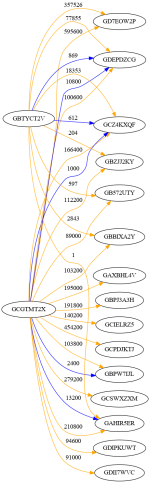
GD7EOW2PIT4YPLBAP3O4SXKVA5PSRRJKYDO5IXNQDASXPKGCHZJ2TX2Q 595600.00 
GCPDJKTJEZZNO3FRCDQ424PZWPNJNEO7XUIPS364EZ7YKWVFBLSL5CGA 454200.00 
GCSWXZXMJAWP3MV4N6JBLGKSRXR632A5OWQXXYRWF67ZMDLMU42XJP3O 279200.00 
GAHIR5ERN26ORNDNWUMKNAUDZQRJISSBNU76IIIEM55LIAFUXWS2TVH4 210800.00 
GAXBHL4VZUVEDZLFZNZB27XSA3WKD6Z2RERRK3ZVWC7RX5I42TOF64MN 195000.00 
GBPJ3A3HIH2PEUBHJC55IUSTW734EQVEMJ72A7NXY7MM5ORCWPBEGHHA 191800.00 
GCZ4KXQFSANZK5PPPV2Z37O4NNQCL4XNWGM5TZSZSETSJYVR7QDVFDQU 166400.00 
GCIELRZ5HNIPNYHB3ZEFIGDO4WYB5KE2GXEE7DT6YUVEIAPDK6R2PXZN 140200.00 
GBZJJ2KYXRS4XSIF4DIVZLFHACZQH4PSO43LJWEDPOF7IMPH6PWCD6KL 112200.00 
GBPW7IJL5KRDOM5RGMKVVPO6Q6DLBAZIBXV3AB5OIXKZ5MUQC4GIRWRQ 103800.00

Again, please do not dox yourself by exclaiming "hey, look at me there. That's me !".

The purpose here is simply to look under the hood of this thing called Kinesis

99 minters are above 10K:

Code:
linux> awk '($2>10000) {print $0}' MinterAccounts | wc -l
99

Next step is figuring out the bare bones of mint cycling

I'll take a break. My brain is fuzzed up.
 
Correction:
Code:
linux> grep -v  200.00 MinterAccounts | wc -l
694
linux> grep -v -w  200.00 MinterAccounts | wc -l
814

694 of 1258 minted more than 200
814 of 1258 minted more than 200


I'm clearly a little too trigger-happy with grep
-w
for full word
I was picking up
1200.00
2200.00
etc...

Actually let me be far more specific:
inux> grep 200.00 MinterAccounts | cut -d " " -f2 | sort -u -r -g
454200.00
279200.00
140200.00
112200.00
103200.00
65200.00
53200.00
42200.00
41200.00
27200.00
23200.00
21200.00
19200.00
18200.00
15200.00
13200.00
12200.00
11200.00
10200.00
9200.00
8200.00
6200.00
5200.00
4200.00
3200.00
2200.00
1200.00
200.00
 
Back to checking out our Minter Top Dog
GD7EOW2PIT4YPLBAP3O4SXKVA5PSRRJKYDO5IXNQDASXPKGCHZJ2TX2Q 595600.00

Set a new symbol to work cleanly
Code:
linux> Target=GD7EOW2PIT4YPLBAP3O4SXKVA5PSRRJKYDO5IXNQDASXPKGCHZJ2TX2Q

linux> sed '1d' $KAG_extract | sed 's/\"//g' | awk -F, -v e=$KAG_EmissionAccount -v h=$KAG_HotWalletAccount -v t=$Target '($4=="create_account") && ($11==e) && !($10 % 200) && ($8==t) {printf "%s\t%9.2f\t%s\t%s\n", $11, $10, $6, $8}' | sort -k1 -k3.1,3.4n -k3.6,3.7n -k3.9,3.10n -k3.12,3.13n -k3.15,3.16n -k3.18,3.19n | cut -f2 | paste -s -d+ | bc -l
595600.00

595600.00
Sanity check

Open that same basic query
after removing distracting 56 character long Stellar addresses. Gotta be kind to da eyes

Code:
linux> sed '1d' $KAG_extract | sed 's/\"//g' | awk -F, -v e=$KAG_EmissionAccount -v t=$Target '($4=="create_account") && ($11==e) && ($8==t) && !($10 % 200) {printf "%9.2f\t%s\n", $10, $6}' | sort -k2

Incomprehensibly the date sort in Column 2 of this particular output succeeded. Usually I get very fuzzed up sorting dates. linux sort is normally a mighty strange animal.

Oh, the output:

Code:
linux> sed '1d' $KAG_extract | sed 's/\"//g' | awk -F, -v e=$KAG_EmissionAccount -v t=$Target '($4=="create_account") && ($11==e) && ($8==t) && !($10 % 200) {printf "%9.2f\t%s\n", $10, $6}' | sort -k2 
  1800.00    2021-02-17T08:19:48Z
  1600.00    2021-02-17T19:55:44Z
  6800.00    2021-02-18T12:37:23Z
  1800.00    2021-02-18T16:05:44Z
 11600.00    2021-02-18T17:58:42Z
  8200.00    2021-02-18T18:17:42Z
 15000.00    2021-02-22T06:48:36Z
  1800.00    2021-02-22T06:53:56Z
 32800.00    2021-02-22T06:59:16Z
 32400.00    2021-02-22T07:01:51Z
 24200.00    2021-02-22T11:30:07Z
  8000.00    2021-02-22T11:31:12Z
 13400.00    2021-02-22T11:33:32Z
 58600.00    2021-02-22T12:20:27Z
 92400.00    2021-02-22T17:10:53Z
 33600.00    2021-02-23T15:37:38Z
 41200.00    2021-02-23T15:39:58Z
 38000.00    2021-02-23T15:43:49Z
 13200.00    2021-02-23T17:22:06Z
 10800.00    2021-02-23T18:12:52Z
 51200.00    2021-02-23T19:23:52Z
  8000.00    2021-02-25T06:45:28Z
  9400.00    2021-02-26T12:19:45Z
  8000.00    2021-03-01T06:38:30Z
  4600.00    2021-03-01T07:12:05Z
  4600.00    2021-03-01T07:16:25Z
 12200.00    2021-03-01T08:07:16Z
  9200.00    2021-03-01T08:18:06Z
  9800.00    2021-03-01T08:39:36Z
  7400.00    2021-03-01T09:13:31Z
  9000.00    2021-03-01T17:19:45Z
  1800.00    2021-03-01T18:48:42Z
  1600.00    2021-03-01T19:03:48Z
 11600.00    2021-03-01T20:41:03Z

Top Dog was busy in (FEB to first day of MAR) 2021
Weeks 7 to 9 in 2021:

Code:
linux> ncal -w -A 1 feb 2021 
    Februar 2021      März 2021         
Mo  1  8 15 22        1  8 15 22 29   
Di  2  9 16 23        2  9 16 23 30   
Mi  3 10 17 24        3 10 17 24 31   
Do  4 11 18 25        4 11 18 25      
Fr  5 12 19 26        5 12 19 26      
Sa  6 13 20 27        6 13 20 27      
So  7 14 21 28        7 14 21 28      
    5  6  7  8        9 10 11 12 13

If Top Dog was Mint Cycling, I wonder what Redemptions looked like around that time period?
Let's 'ave a look.

Next Post:
 
To study redemptions, we have to switch gears out of create_account records and go for payment records.

We learnt that when matching up a few one-liner awk scripts to match the coins in circulation at the top of the Kinesis Explorer screen.

Specifically, we can use previous work here:
x3=`sed '1d' $KAG_extract | sed 's/\"//g' | awk -F, -v x=$KAG_HotWalletAccount -v y=$KAG_EmissionAccount '( ($4=="payment") && (($13==x) && ($14==y)) ) {sum_15 += $15} END {printf "%-10.2f\n", sum_15 }'`

This basically summed
Flow (H, E)
for all records of Type payment
ie
x[H, E]

Reminder of the result to get an idea of orders of magnitude:

Code:
linux> sed '1d' $KAG_extract | sed 's/\"//g' | awk -F, -v x=$KAG_HotWalletAccount -v y=$KAG_EmissionAccount '( ($4=="payment") && (($13==x) && ($14==y)) ) {sum_15 += $15} END {printf "%-10.2f\n", sum_15 }'
5207555.92
5207555.92
may not be up-to-date today but no matter. We are checking logic and syntax. And making it public so that anybody with a technical disposition can save hours of detective work.

I wonder if we can risk selecting on a UTC date range ?

2021-02-17T00:00:00Z
2021-03-05T00:00:00Z

That would be something init?

Code:
linux> sed '1d' $KAG_extract | sed 's/\"//g' | awk -F, -v x=$KAG_HotWalletAccount -v y=$KAG_EmissionAccount '( ($4=="payment") && (($13==x) && ($14==y)) && ( ($6>"2021-02-17T00:00:00Z") && ($6<"2021-03-05T00:00:00Z") )) {print $6, $15}' | sort -k1
2021-02-22T07:53:06Z 60000.0000000
2021-02-22T14:59:37Z 50000.0000000
2021-02-22T23:47:59Z 20000.0000000
2021-02-22T23:48:34Z 40000.0000000
2021-02-23T16:08:25Z 100000.0000000
2021-02-23T23:36:05Z 50000.0000000
2021-02-24T14:05:16Z 100000.0000000
2021-02-24T23:06:52Z 30000.0000000
2021-03-01T04:55:38Z 10000.0000000
2021-03-01T08:02:51Z 10000.0000000
2021-03-01T08:03:41Z 20000.0000000
2021-03-01T13:39:31Z 20000.0000000

Unbelievable.

Yes we can !

I never thought that would work ;-)

Here we must go back and ponder one key insight collected from previous forensics work here. Namely Redemptions do not occur in 1:1 manner. At least not up to the minute.

Someone somewhere at Kinesis made the very sensible decision not to clutter up the blockchain (and thus the Explorer screen) with redemptions of size 1 unit and chose to gather these up in a kind of convoy:

60K
50K 7 hours later
20K 9 hours after that
and so on
as seen in the very output above. In detail.

I wonder what the total was over the above time period ?

Please note other mintings may have occurred over the same time period. Numbers may not match up exactly.

Let's see at any rate:

Code:
linux> sed '1d' $KAG_extract | sed 's/\"//g' | awk -F, -v x=$KAG_HotWalletAccount -v y=$KAG_EmissionAccount '( ($4=="payment") && (($13==x) && ($14==y)) && ( ($6>"2021-02-17T00:00:00Z") && ($6<"2021-03-05T00:00:00Z") )) {print $15}' | paste -s -d+ | bc -l | xargs printf "%-10.2f\n"
510000.00

510K

How much did Top Dog mint over a similar time period?

595600.00
just short of
600K

A 90K difference but in the ball-park dontchathink ?

We are truly in proper forensics mode at last.
 

Translate

Back
Top