
Hi All!
After a couple careful deposits and back and forth with the Kinesis payments team, here are some instructions w screenshots.
Step-by-step instructions to ACH funds(US only) from US Bank to Kinesis
This guide will focus on sending money to Kinesis via Juno.
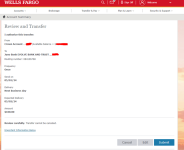
1. Go through your online banking (in my case Wells Fargo) and set up ACH to the new external bank account in your name that you now have with Evolve, using the routing and account number. In my case WF sent the standard two small trial ACH deposits that I had to verify from within Juno; this took about a day.
2. While you wait, set up your recipient within Juno, by following these screens; the details are found in the KMS under deposit here:
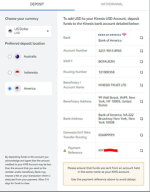
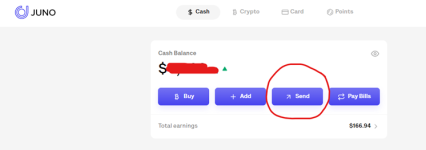
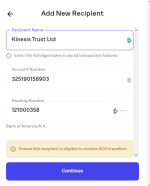
3. Once your bank ACH trial deposits are set, you can do a test send from US Bank to Juno. There are other ways to instantly fund Juno but they all have fees. You are free to explore those if you want the USD to get into Juno faster(Apple Cash and Cash App).
4. Once you have the cash in Juno, you can send funds to Kinesis. I always reference my Kinesis HIN (Holder Identification Number); it starts with a “KM” followed by numbers: KM12345678 account, but as you’ll see later, we will need to verify account ownership and the actual transaction by using the transactionID. Either way, it’s good to have a screenshot of this referencing your KM number.
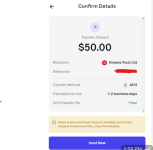
5. The funds will show as deposited by Juno within hours. While you wait, run a Juno account statement for the day of your withdrawal to Kinesis and send it to your account executive and support@kinesis.money. This is the one time that you need to prove that the account number is connected to your name.
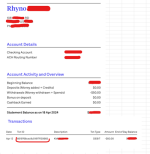
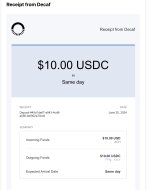
6. For future deposits you just need to send the transactionID screenshot:
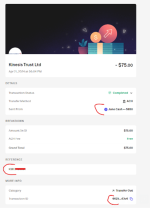
7. Once the funds are credited in your KMS account, you will see this as well as get an email:
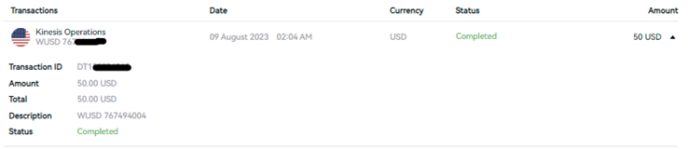
***You are all set; please feel free to share feedback on how to improve this document***
After a couple careful deposits and back and forth with the Kinesis payments team, here are some instructions w screenshots.
Step-by-step instructions to ACH funds(US only) from US Bank to Kinesis
This guide will focus on sending money to Kinesis via Juno.
- Sending money to Kinesis via Juno is not instant because the Kinesis Payments team must credit the funds to your specific KM account; it is however completely free.
- In order to use this method you need to open a Juno.finance account, KYC and follow these instruction.
- Juno is a Neobank with a normal checking account that currently pays ~5% and a few cryptos they sell.
- Once you have a Juno account, look in your settings to see your daily/monthly limits. It will vary per user
- The simplest way to fund your Juno account is FROM WITHIN YOUR regular US BANK ACCOUNT (transferred as pictured). So think of this as “pushing” funds via ACH to another account you also own. Your bank will guide you through these steps; they are all a bit different.
- Side note, due to AML rules, the account holder on the US bank account must also match those of the Kinesis account holder. As long as you are listed on both accounts even if they are joint you will be fine. If they do not the transfer will be declined by Kinesis.
1. Go through your online banking (in my case Wells Fargo) and set up ACH to the new external bank account in your name that you now have with Evolve, using the routing and account number. In my case WF sent the standard two small trial ACH deposits that I had to verify from within Juno; this took about a day.
2. While you wait, set up your recipient within Juno, by following these screens; the details are found in the KMS under deposit here:
3. Once your bank ACH trial deposits are set, you can do a test send from US Bank to Juno. There are other ways to instantly fund Juno but they all have fees. You are free to explore those if you want the USD to get into Juno faster(Apple Cash and Cash App).
4. Once you have the cash in Juno, you can send funds to Kinesis. I always reference my Kinesis HIN (Holder Identification Number); it starts with a “KM” followed by numbers: KM12345678 account, but as you’ll see later, we will need to verify account ownership and the actual transaction by using the transactionID. Either way, it’s good to have a screenshot of this referencing your KM number.
5. The funds will show as deposited by Juno within hours. While you wait, run a Juno account statement for the day of your withdrawal to Kinesis and send it to your account executive and support@kinesis.money. This is the one time that you need to prove that the account number is connected to your name.
6. For future deposits you just need to send the transactionID screenshot:
7. Once the funds are credited in your KMS account, you will see this as well as get an email:
***You are all set; please feel free to share feedback on how to improve this document***
Attachments
Last edited: