• Short guides to forum navigation, searching, posting, translation, alerts and notifications viewable by clicking here.
  • Türk dostlarımıza hoş geldiniz Giriş burada.
  • Scammers are running ads on Facebook and Instagram claiming a giveaway. DO NOT OPEN THESE LINKS AND LOG IN. See this thread: here
  • The Kinesis Community Forum will be down starting on Friday, Eastern Standard Time, and is expected to be back online on Monday. Big changes in the backend are coming!

Don't walk naked where sparks are flying - Why you should use a password manager

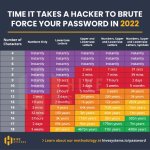
Thank you for posting this. I heard a long time ago that symbols (+ long password) were the key to a secure password. This infographic supports this. Thanks for sharing.
 
Last edited:
So 18 characters utilising Numbers, Upper and Lower case letters and Symbols might buy me a bit of time may be Ill add in some Japanese Kanji and Arabic text just to make sure. lol

2FA should harden up the attack zone considerably too
 
Last edited:
... and how to remember those long, complex passwords?

Password managers come in handy here.
They can quickly auto-generate strong passwords, then you just have to remember one even longer password phrase.
Some also provide access to the password manager via hardware devices like Yubikey.

Here are a few examples of password managers:
  • Bitwarden
  • LastPass
  • 1Password
  • NordPass

Feel free to add others below.
 
It worth paying for a password manager...I personally avoid anything free.. even the free versions of above.
 
Can Kinesis shut account down after 5 or 7 invalid attempts and then notify email/ text of these invalid attempts? This would stop some theft I would think.
 
Password managers: take a look at Keepass. I like a local database I have access to, and no dependency on online anything.
 
As Uchiki mentions upthread, the use of a password manager is absolutely imperative in todays world.

These tools easily allow you to utilize complex random passwords of length on all sites - with no duplication. Add in 2FA and you have an exceptionally robust hack-proof strategy.

I'm a fan of 1Password and have used it for several years, but I'm sure some of the others mentioned are equally effective. From my perspective, these are some of the features you should look for in any password manager:

- End to end encryption (no possibility of access at any point)
- Local DB storage (as Derek mentions above - and encrypted)
- Code signature validation for Browser security
- Autolock (after use, you want a fast relock)
- Cross device syncing (laptop, desktop, phone, etc)
- Biomteric access for day to day ease of use
- Disaster recovery strategy (Fire destroys all devices - you're back on new device)

Unless you're only looking at a few cat photos on instagram - you need a password manager. Not having one is like walking naked through a busy welding shop.
 
Last edited:
And if you don't like that, you can simply buy a notebook and create your passwords using a method that makes sense to you.

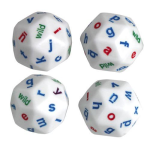
Back around 1990 or so when you signed up with Compuserve, they mailed you a temporary password that was of the form [random word][symbol][random word]. That works today too - just find a reasonable way of grabbing random words (a dictionary might work really well), use more than 2 words, be a bit random about what letters are capitalized, and numbers. I actually bought a pair of dice when I was using this method and it works well - maybe one of the dice is for capitals and the other is for normal size.

1669565204181.png

The goal, in the end, is to have a unique password on each site you use. Each password (in my opinion) should be something you can easily type or copy/paste, and should be constructed in such a way that the easiest attack is to brute force it, which leads us to the chart above.

So if you use something cute that's been used before by anyone on a site that's been hacked, that's the first thing that'll be tried by hackers as a shortcut. After that it'll be that same list of passwords with basic modifications like putting a number at the end, swapping the e's for 3's, o's for 0, and so on. After that it's easiest to move on to the next target which might be better secured.

But (generating this on the fly) scheDuling*pEthacrynicAcid&shipboard04 isn't gonna show in anyone's list, and while you can see how it's derived and where I decided to throw in different bits of entropy (3 words from the dictionary, threw 2 dice and one was wild so I went with *) it's not weak. And it's something you can memorize if you fee like it, or type into your phone easier than if you have a password that mixes zeros and capital O's and lowercase L's and ones.

Just don't reuse passwords. And don't pick something that's on the list of the million most common passwords. And make sure you've got lowercase, uppercase, and at least something else.

Edited here: Nordpass generated this using their standard settings: 3tk&sRjLyT$s. I think something self-generated is easier to memorize or type, but maybe that's just me. According to the chart above this password is still in the 3,000 years to crack category.
 
As Uchiki mentions upthread, the use of a password manager is absolutely imperative in todays world.

These tools easily allow you to utilize complex random passwords of length on all sites - with no duplication. Add in 2FA and you have an exceptionally robust hack-proof strategy.

I'm a fan of 1Password and have used it for several years, but I'm sure some of the others mentioned are equally effective. From my perspective, these are some of the features you should look for in any password manager:

- End to end encryption (no possibility of access at any point)
- Local DB storage (as Derek mentions above - and encrypted)
- Code signature validation for Browser security
- Autolock (after use, you want a fast relock)
- Cross device syncing (laptop, desktop, phone, etc)
- Biomteric access for day to day ease of use
- Disaster recovery strategy (Fire destroys all devices - you're back on new device)

Unless you're only looking at a few cat photos on instagram - you need a password manager. Not having one is like walking naked through a busy welding shop.

Your last comment made me 😆
 
Moving this to the How-To section so it will be easier to find.
Thanks to Trish for starting it off.
Revised title inspired by Jeff.
 

Translate

Back
Top